EYFS planning for ages 2–4

Your ethos in every plan. More time with the children.

OurEthos is a fortnightly, topic-based planner that keeps every room's planning true to your nursery's values, covers all seven areas of learning, and gives your team hours back.

CL PSED PD Literacy Maths UW EAD
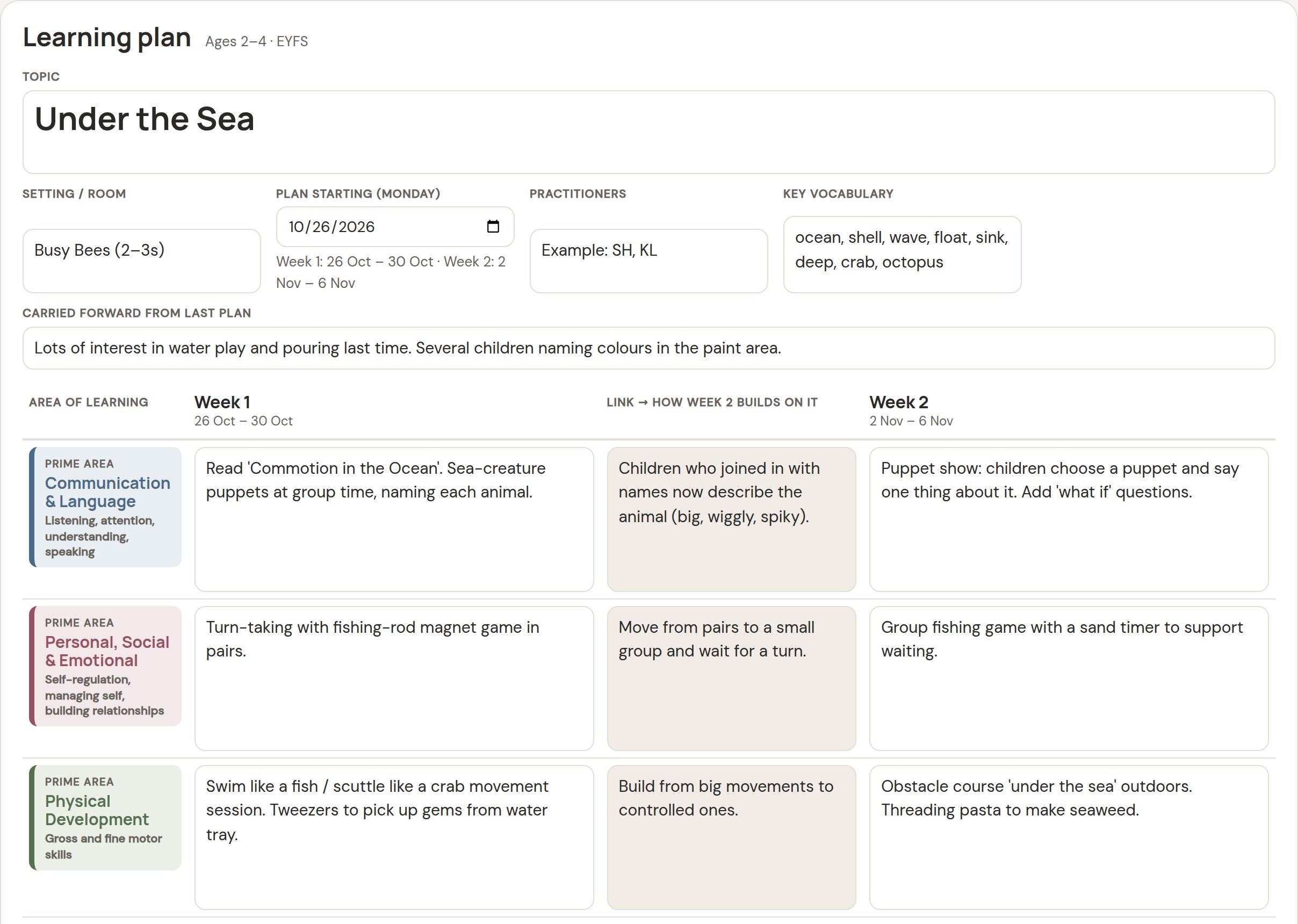
The learning plan sheet for an 'Under the Sea' topic: a row for each EYFS area with Week 1 activities, a shaded column showing how Week 2 builds on it, and Week 2 activities.

The plan sheet, with an example "Under the Sea" fortnight.

Why it exists

Planning was taking too long

My fiancée works in a children's nursery. She told me that planning activities with the system they had took far too long: a fortnight's topic across every area of learning, then writing up what the children gained and what comes next.

Every hour spent on paperwork is an hour not spent running activities, making observations and being with the children. So I built a planner that does the repetitive parts for you, using the format practitioners already think in.

It also does something for owners. When every room plans in the same structure, it is easy to see that planning covers every area and reflects the nursery's own approach.

“Can you make something that's quick to fill in, covers all of the EYFS, and shows how week 1 leads into week 2?” The brief that started it
Who it's for

Built for the room and for the office

Practitioners

Get your time back

  • The same clear layout every fortnight, so you are never starting from a blank page.
  • A link column shows how week 2 builds on week 1, written once rather than explained twice.
  • Next steps carry forward into the next plan at the press of a button.
  • Reuse past topics instead of rewriting them.
  • Type on a laptop or tablet, or print a blank copy and write by hand.
Owners and managers

Planning that follows your ethos

  • Every room plans in the same structure, covering all seven areas of learning.
  • See what each room and each member of staff is planning, in one place.*
  • Leave feedback on a plan that the whole team can read.*
  • Add your nursery's ethos statement so suggested activity ideas fit your approach.*
  • Plans print on three A4 pages, ready for the wall or the planning folder.

* In the online version.

How it works

One fortnight, start to finish

Before week 1

Plan the topic

Choose a topic, key vocabulary and activities for each area. Note how week 2 will build on week 1.

During each week

Note what was gained

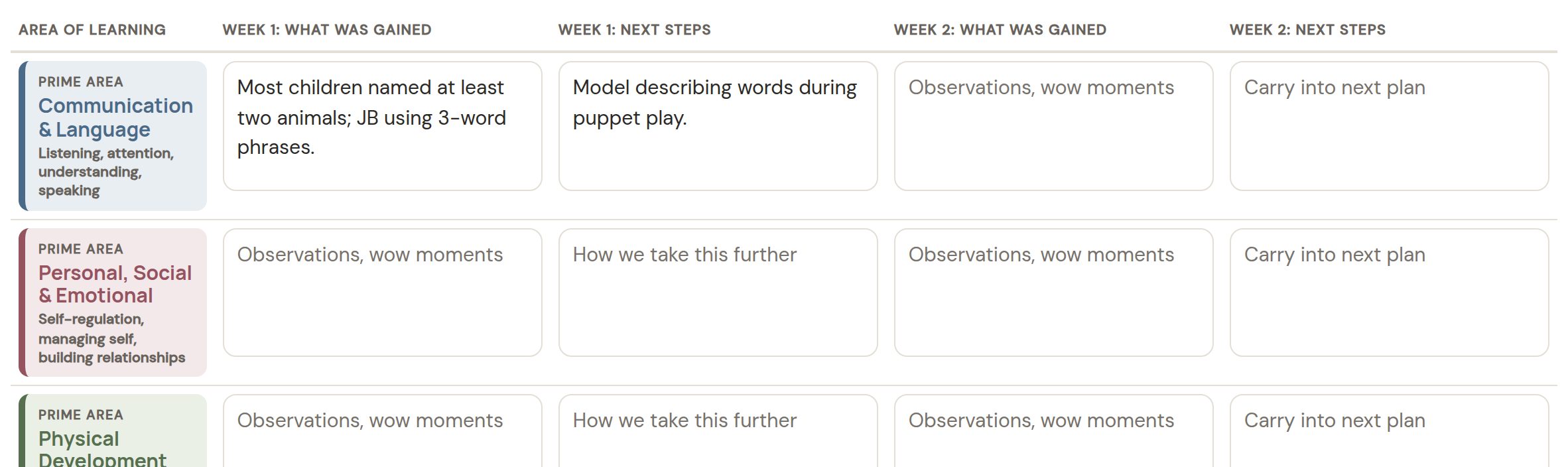
Jot down observations and wow moments for each area, and tap the areas each child showed an interest in.

End of each week

Write the next steps

Week 1's next steps shape week 2. Week 2's next steps shape the next fortnight.

End of the fortnight

Start the next plan

One button moves the dates on, carries the next steps forward and keeps the children's initials.

PrimeCommunication & LanguageListening, attention, understanding, speaking
PrimePersonal, Social & EmotionalSelf-regulation, managing self, relationships
PrimePhysical DevelopmentGross and fine motor skills
SpecificLiteracyComprehension, early reading, mark making
SpecificMathematicsNumber, pattern, shape, space, measure
SpecificUnderstanding the WorldPeople, communities, the natural world
SpecificExpressive Arts & DesignCreating with materials, imagination, music
Children's privacy

Initials only, by design

The planner asks for children's initials and nothing else: no names, photos or dates of birth.

The free planner keeps everything on your own computer. Nothing is uploaded anywhere.

What it asks for
  • Children's initials, such as JB or AM
  • The areas each child showed interest in
  • A short note, written about the activity
What it never asks for
  • Full names
  • Photos
  • Dates of birth
Free planner and online version

Start free. Share it with your team when you're ready.

The free planner is yours to keep. The online version is being piloted with a small number of nurseries.

Feature Free plannerDownload, no account Online versionPilot
Plan, review and children's interests sheetsYesYes
Print three A4 pages, or a blank copyYesYes
Carry next steps into the next planYesYes
Works without internetYesNo
Whole team, every room, any deviceOne computerYes
Library of past topicsSaved filesSearchable
Owner view of every room's plans, with feedbackNoYes
Step-by-step plan builder for new staffNoYes
Activity ideas that fit your ethos (optional AI)NoYes
Parent updates for your noticeboard or appNoYes

Try it with your next topic

Download the free planner and use it for one fortnight. If you'd like to try the online version with your team, get in touch and tell us about your nursery.

Questions

Questions nurseries ask

How do I open the free planner?

Download the file and double-click it. It opens in Chrome, Edge or Safari on a laptop or tablet. There is nothing to install and no account to create. It opens with an example plan so you can see how it works; press "Start a blank plan" to begin your own.

Where is my work saved?

The free planner saves automatically in the browser on that computer. Use "Save to file" to keep a copy of each fortnight, or to move a plan to another computer. The online version saves for your whole team.

Is it Ofsted approved?

Ofsted does not approve planning tools or require a particular planning format. Settings choose the approach that works for them. This planner follows the seven areas of learning in the EYFS framework, and keeps planning clear and consistent so it is easy to talk through.

Does it replace Famly, Tapestry or our learning journal app?

No. Those apps are built around observations, registers and parent communication. This planner is for the planning itself, and works alongside them. The online version can write a parent-friendly update that you can paste into your existing app.

What ages is it for?

It is designed for 2 to 4 year olds, working within the Early Years Foundation Stage.

Does it use AI?

The free planner does not. The online version has optional AI suggestions for activity ideas, which a nursery can leave switched off. When it is used, children's initials are never sent.

How much does the online version cost?

Pricing is being set with the nurseries in the pilot. The free planner stays free.
